When laser light is weak or no light (20W and 40W laser)Updated 19 days ago
When you are using the laser but finding no light or only a small blue dot, check if the laser power is set to maximum. Also, test the adapter voltage output and PWM signal. Specific testing steps are as follows:
Step 1: Check if the maximum S-value setting in the mechanical settings of LightBurn is 10000.
If it differs from the control board parameters, the laser output power will drop significantly, causing the actual output power to differ from the percentage power controlled by the software.
Step 2: Use a multimeter probes to measure the voltage of the red and black wires respectively.
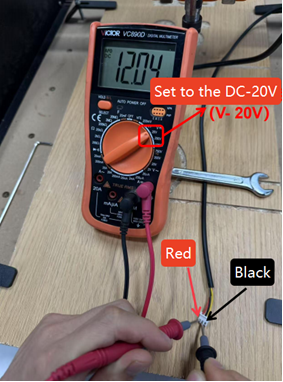
20W laser: If there is no 12V in the wiring harness when directly plugged into the chassis, the machine's control board is damaged.
40W laser: If no 12V is measured when using an external power supply, measure whether the adapter has voltage output. If there is no voltage output, the adapter is damaged.
Step 3: Use the multimeter probes to measure the yellow and black wires respectively, confirming that the PWM signal is turned to maximum.
The measured signal should be around 4V (around 3.2V for some older models). If no PWM signal is measured, the machine's control board is damaged.
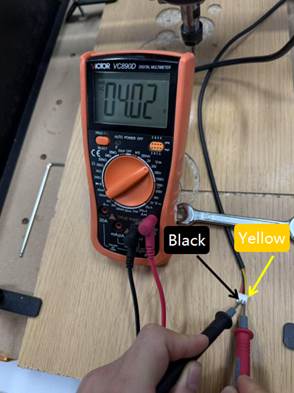
PWM test prerequisites: When testing PWM, the computer needs to control the laser to 100% power. The measured PWM signal at this time is the maximum signal voltage. When using an offline controller, click “Laser” to turn on the laser, then click “Speed” 9 times. At this time, the PWM voltage output by the control board will be at its maximum.
Please send order ID + machine model + problem + test results to below e-mail: [email protected]
We will offer a solution and assist you in solving the issue based on the test results as soon as possible. Appreciate for your assistance and support!